
Understand
Plain words, with technical evidence when you need it.
The slow mornings. The sudden restarts. The disk that’s always full. Turn your PC’s clues into a clear next step.
Windows 10 & 11 · x64
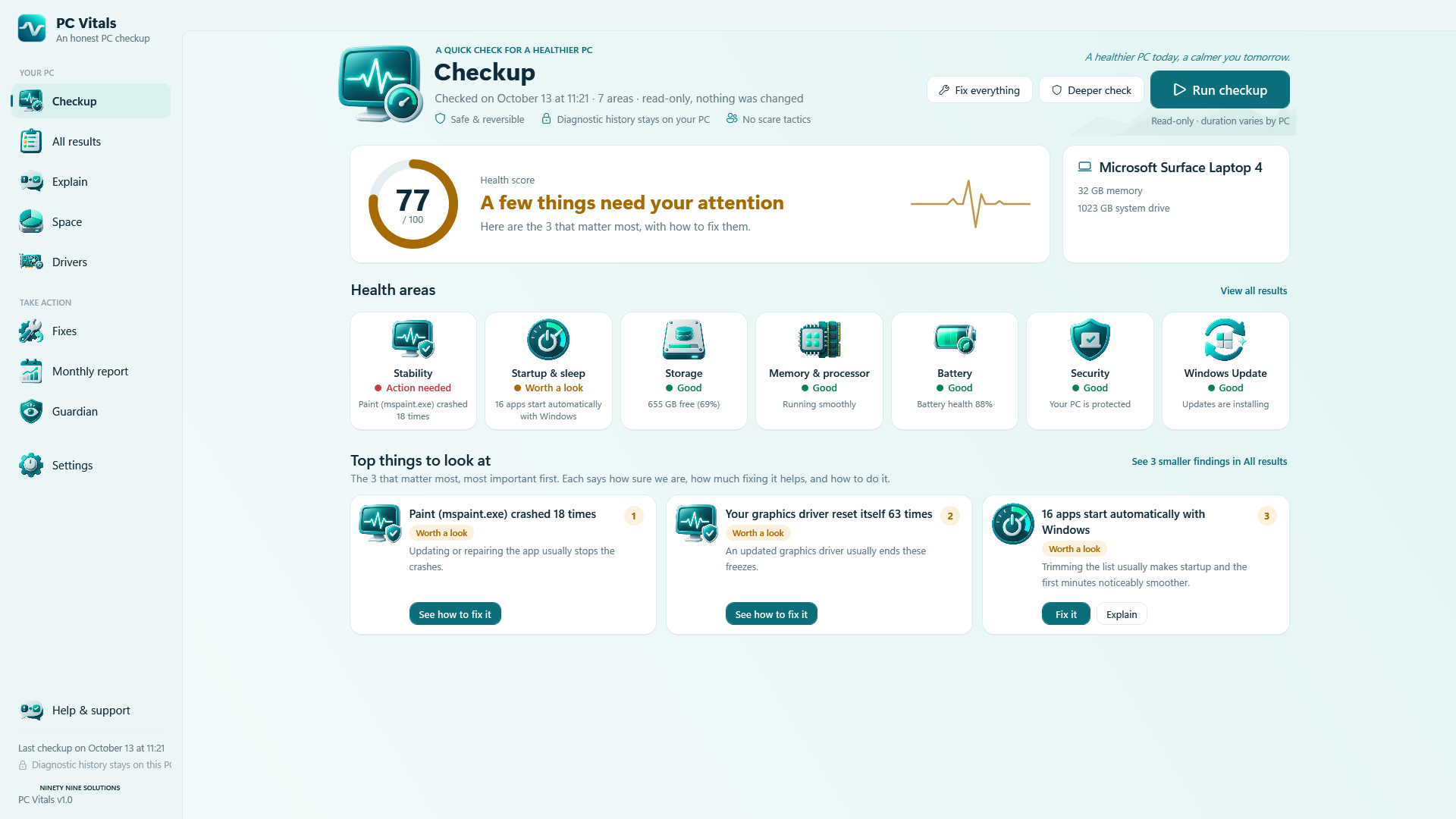
Windows has the clues. PC Vitals brings them together, explains what they mean and helps you decide what deserves attention.
Plain words, with technical evidence when you need it.
Up to three headline findings, with confidence and impact.
Manual instructions stay free. Assisted fixes are optional.
Screenshots captured from PC Vitals 1.0.0.0 on Windows. Select a screen to see the interface and what it does.
Run a read-only checkup, review the health areas and open the top three findings. The engine collects startup, stability, storage, memory/processor, battery, security, updates, driver, cooling, sleep, network and privacy information where Windows provides it.
Screens are shown in English; the app includes seven language options. Values belong to the captured session, not your computer. This website does not run a PC scan.
Browse crashes, blue screens and Windows error codes, with context and practical instructions.
Explore folders, large files and duplicate candidates. Keep system files clearly separated.
Review what changes, whether it needs permission and how recovery works before you apply a remedy.
Guardian compares local checkups, lists changes and raises selected alerts. Weekly upkeep is opt-in.
Compare saved checkups, boot times, capacity and fixes in a report you can keep or share.
Seven app language options, including French and Arabic, with right-to-left layouts.
No registry cleaner. No RAM booster. No made-up problem counts. Findings link back to measurements, with gaps and uncertainty left visible.
Checkups save local system information. Duplicate search reads file contents locally to compare hashes. Network checks, Store purchases and Windows Update drivers can contact their respective services.
Understand your Windows PC’s health.
YOU ARE HEREUse and test Android devices from a Mac.
EXPLORE DEVICELABMake your Windows desktop your own.
EXPLORE HARBORChoose your release channel. This page checks the published release information when you open it, so download links follow the latest verified version.
Unsigned development installer: Windows may show an unknown-publisher or SmartScreen warning. Store purchases are unavailable in this edition.
f80e757e14c2e5032213b8e53eed344eadc8d81a5c35f321950a7026b2cf07afWindows x64 Setup.exe · Per-user installation with Start menu shortcut and Windows uninstall support. The .NET runtime is included.
Automatic updates: PC Vitals checks at launch and every six hours while open, downloads newer development releases in the background, then installs them on the next normal launch. Disable this in Settings. Stable, beta and Store channels remain separate.
Portable ZIP · 1.0.0.0 · x64. Extract the complete folder, then open Vitals.exe. The .NET runtime is included.
Unsigned development build: Windows may show an unknown-publisher or SmartScreen warning. No installer or automatic updates. Store purchases are unavailable in this edition.
Download development ZIP · 1.0.0.001ae3bcd9a49ae118c3294f984cd5700c5d84d497947d3345f98719c5417ee1dThe App Installer download is designed to let Windows check for updates on launch and in the background. Requires a signed release and a supported App Installer.
No signed stable or beta installer is published yet. The portable development download is listed separately above.
Install and manage updates through Microsoft Store once the listing is available.
The development EXE uses its separate development updater. Future stable/beta MSIX releases use Windows App Installer; Microsoft Store manages Store installations.
Release notes will appear with the first published build.
No signed stable or beta installer is published yet. The portable development download is listed separately above.
The diagnostic checkup, Explain, Space map and manual instructions are designed to remain free. Assisted fixes, Guardian and reports are offered through optional add-ons, with a seven-day trial. Final availability is shown with each release.
No. PC Vitals reports selected Windows security information. It does not scan for malware or replace Windows Security.
No. Startup and certain settings have direct undo. Disposable-cache cleanup is not reversible. Some repairs rely on System Restore. The preview explains the recovery option.
No. Disk wear and boot timings may need administrator rights. Temperature and battery data depend on the device. Missing readings should remain visible as unavailable.
Microsoft Store manages its own installs. The direct channel is prepared for signed MSIX releases installed through Windows App Installer. No update service is claimed live before a verified package is published.
The practical details for choosing and using this product. Check the selected release notes for feature availability.
Up to three headline findings, supported by measurements.
Crashes and Windows errors in plain words.
Explore storage, large files and duplicates.
Preview a change and understand its recovery options.
Optional background checks and change alerts.
Compare saved checkups and export a health report.
Read Windows measurements.
Review the evidence and manual steps.
Choose a fix, review it and measure again.
Checkup history is stored locally. Network diagnosis, Store purchases and official driver updates may use network services.
Read the download section for the selected release’s signing warnings, hardware requirements, known issues and installation guidance. Development and test builds remain separate from stable.
No. DeviceLab connects Android devices to a Mac. PC Vitals checks the Windows PC itself.
No. Harbor Dock organizes the Windows desktop. PC Vitals explains its health.